Overview
A cozy farming/chore/decoration game with a narrative throughline with story-required content lasting just over 2 hours.
Soon to be released on steam.


Tools
Tools have been incredibly important throughout the entirety of development.
Some of these are for me specifically to more easily test out a system, with each visual debug element being very easy to add, and backed up by console commands.
Take for example the hide and seek cheat, where it just points me to where the kid is hiding. A bit unfair, but the alternative is I waste 4 minutes every time I want to test the minigame. In the same image, you can also see the outlines of the debug draws for sweeping and just barely weeding. That, and a failed assert since I used a console command to start hide and seek without meeting everyone first, which is impossible in a normal playthrough.


But the other type of tool is the type I make for non-technical team members. Take for example the cheat menu, internally named the "Ian menu" after the titular artist on the team. Console commands for all the shown actions have always existed, but my artist doesn't like console commands, so I made the UI, and it's been used extensively by everyone ever since. It also includes a list of the common commands they may want to use, with the no-parameter ones having a button, too.

Also of note is the dialogue visualization tool. Dialogue was simple at first, so it wasn't a problem to just edit a data asset. But as more sections, features, levels of indirection, branches, and effects were added, it got a bit confusing.
So to remedy this, I made a visualization tool using a custom UEdGraph. I call it a visualization because it was initially just that— visualization of the data in the data asset, but you could click on the nodes to modify that specific data view. But as the writer/designer used it more, they wanted to be able to add to it within the same context. So, I added the ability to write to the graph, albeit in a limited manner. You can't directly add nodes, but dragging off of any pin will give a bunch of options to add, and I've done my best to "guess" what that means in each scenario, updating the data asset appropriately.

Playtesting
We playtested a lot throughout development, and one day we thought of a setting that could be good, but we had no idea which way to go on it. This was whether we should automatically progress to the next day, or stop time at midnight and force the player to go and sleep before the sun and NPCs would come back out.
So, we put it to an AB test. We had 3 people play through the game with time auto progressing, and 3 without. Test participants were asked to not share what's different, and only knew that there was something different.
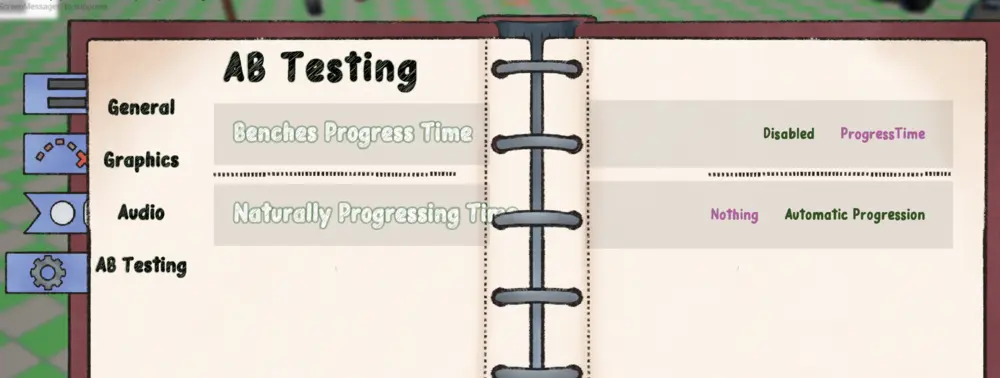
At the end of the playtest, we firmly concluded that naturally progressing to the next day was by far the better choice. After being told what the difference was at the end of the session, one of the playtesters even got annoyed that they didn't have that version, and replayed the entire game with the setting enabled.
Miscellaneous
Playing to our strengths
When developing in a short period of time with external responsibilities, we had to play to each-other's strengths. One of the reasons our characters are all 2D was to allow a wide breadth of characters with a single artist. Although this would be strongly limited by having to draw animations, so we decided on programmatic animations for all characters, where they bounce and sway all with transforms.
We also leaned into the whimsy of it like by having the characters just squash when they sit, or letting our main character jump down the slide.


Naturally all of this logic is exposed via parameters and easy-to-edit curves.


This 2D-3D mix is present throughout the entire game, with most objects being composed of simple planes.

Localization
Since development started while in Japan, and we had a bunch of native Japanese teammates we were collaborating with on other projects, we wanted to fully localize our game into Japanese with text and voice-acting.
Thankfully due to proper foresight on my end, we were fully able to utilize Unreal's localization features. But I can see how one could easily need to re-do a lot of work if they had never localized before and were trying to do so on an existing project. Localizing during development was a whole other can of worms, but it did help us notice some possibly game-breaking issues early on— like with dialogue-timed cutscenes.
Key icons are still placeholders.